
Migrating from a Traditional Secure Web Gateway to Global Secure Access
Installing the client is the easy part.
Migrating the security model safely is where the real work begins.
In the previous article in this series, I looked at how Microsoft Entra Internet Access changes the traditional Secure Web Gateway model by bringing identity, user context and Conditional Access closer to internet security policy.
That describes the destination.
But there is a much more awkward question:
How do you actually get there?
If you already have a mature Secure Web Gateway deployed across thousands of endpoints, you cannot simply decide on Friday afternoon that the old product is going away and Global Secure Access will take over on Monday morning.
There are two migrations happening at the same time.
You are migrating the endpoint enforcement technology.
And you are migrating the security policy.
Both need thought.
There are applications to test, exceptions accumulated over years, endpoint clients to replace, new-build processes to consider and, most importantly, a period during which you need to move the endpoint from one security control to another without accidentally creating a gap in protection.
That last point has become particularly relevant during some recent production testing I have been involved in.
The incumbent product in this environment is Forcepoint, and one of the things we have discovered is that the Forcepoint client and the Microsoft Global Secure Access client do not behave well when installed together in this particular deployment.
Both want to influence traffic acquisition.
Both expect to be in control.
The result is a classic chicken-and-egg problem.
I need Forcepoint removed before I can reliably move the endpoint to GSA.
But I do not want to remove Forcepoint until I am confident that GSA is ready to protect the endpoint.
At the same time, I do not want to take years of Forcepoint policy and blindly recreate it in Entra Internet Access.
That would solve one migration problem while importing another.
So this is not simply:
How do I replace the Forcepoint client with the GSA client?
It is:
How do I move the endpoint and the security policy to a new control model safely, deliberately and without carrying unnecessary legacy baggage with me?
That is where this article begins.
This is not a Forcepoint migration guide.
Forcepoint is simply the real-world example behind the problem. Global Secure Access supports selective traffic acquisition, so coexistence with another SWG can be a valid design option where the products and traffic model support it.
The important lesson is that coexistence needs to be proven with your existing endpoint security stack, not assumed because an architecture diagram says it is possible.
Migration Is More Than a Client Swap
It is tempting to look at an SWG migration as an application deployment exercise:
Uninstall Legacy SWG
        ↓
Install Global Secure Access
        ↓
Done
Unfortunately, that misses most of the problem.
A Secure Web Gateway is not just an application installed on the endpoint.
It represents a security control.
The moment you remove it, you potentially change the security posture of the device.
And the policies attached to the old platform represent years of security decisions --- good, bad and sometimes simply forgotten.
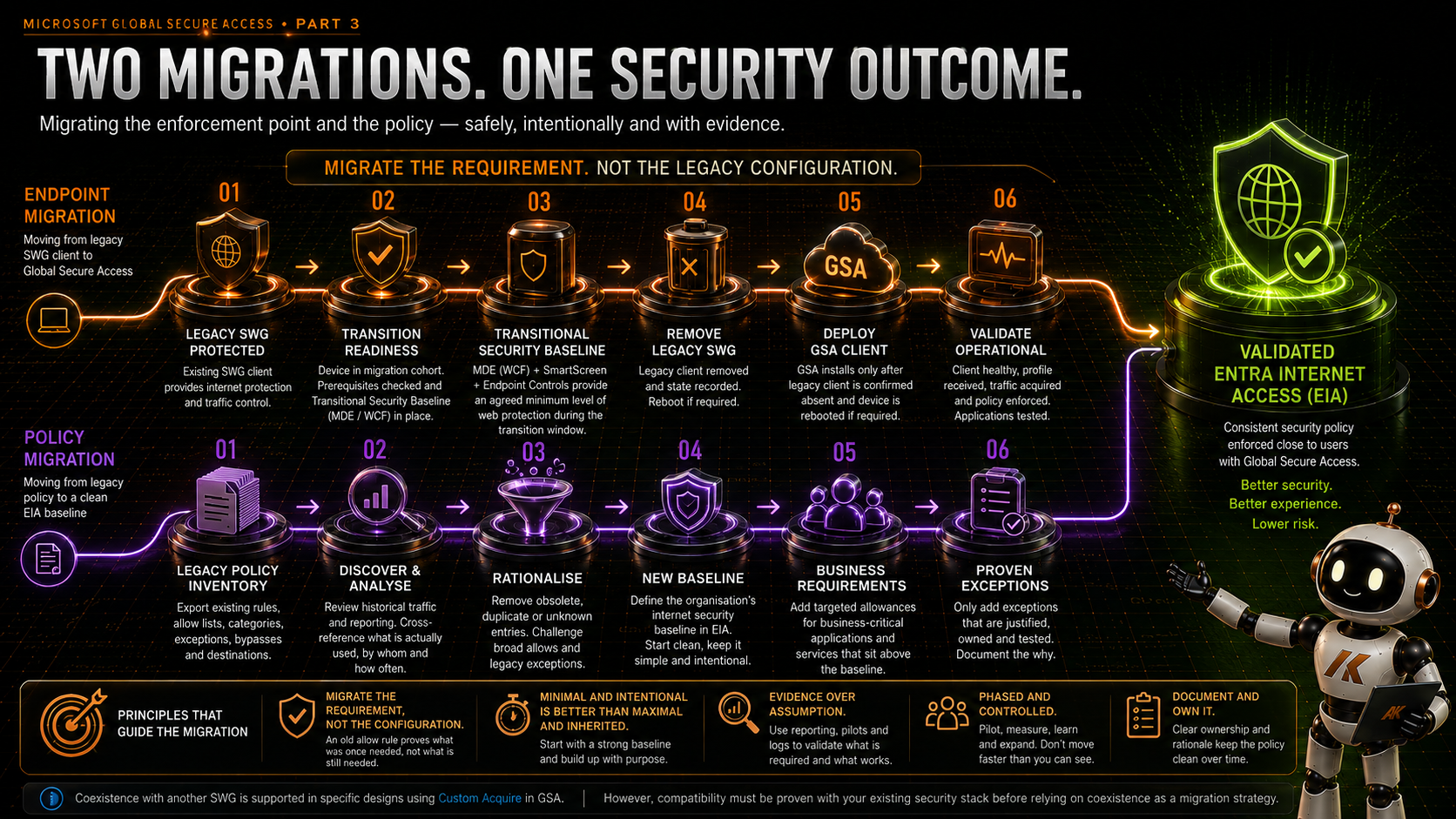
So I see two parallel migration tracks.
ENDPOINT

Legacy SWG
    ↓
Transition Readiness
    ↓
Transitional Protection
    ↓
Remove Legacy SWG
    ↓
Reboot / Transition
    ↓
Install GSA
    ↓
Validate GSA
and:
POLICY

Legacy Policy
    ↓
Discover
    ↓
Rationalise
    ↓
New Baseline
    ↓
Business Requirements
    ↓
Proven Exceptions
Those two tracks eventually converge into the same outcome:
A validated Entra Internet Access service with a clean, supportable security policy.
Start With Discovery, Not Deployment
Before touching the endpoint client, understand what the existing platform is actually doing.
That sounds obvious.
In reality, Secure Web Gateway platforms often contain years of configuration.
Some rules are business critical.
Some were created for projects that disappeared years ago.
Some are exceptions nobody remembers requesting.
Some exist because an application behaved badly in 2019.
Some were emergency changes that became permanent.
And some probably should never have existed in the first place.
This is why I would not approach a GSA migration as:
Export everything from the old SWG and recreate it in Entra Internet Access.
The migration is an opportunity to rationalise the control.
My preference would be:
Discover → Rationalise → Baseline → Business Requirements → Proven Exceptions
The objective should be to understand why access exists before deciding whether it deserves to survive the migration.
Don’t Migrate the Policy. Migrate the Requirement.
This is probably the second biggest lesson in the migration after the endpoint transition itself.
A mature SWG may contain hundreds or thousands of rules, URLs, categories, bypasses and exceptions.
It is very easy to treat that configuration as the specification for the replacement platform.
I wouldn’t.
The legacy configuration tells us what has been configured.
It does not necessarily tell us what the organisation still requires.
An old allow rule is evidence that something was once required.
It isn’t evidence that it is still required.
Perhaps a URL was allowed for an application that has since moved to SaaS.
Perhaps a bypass was added during an incident five years ago.
Perhaps an entire category was opened for a business unit that no longer exists.
Perhaps somebody requested access to a service for a six-month project and nobody ever removed the exception.
Perhaps the reason was never documented at all.
If we blindly recreate every one of those decisions in EIA, we have not modernised the security architecture.
We have simply moved its technical debt.
So my recommendation is simple:
Take the bare minimum required.
And where possible:
Build the new baseline from scratch.
Start With a New Baseline
Rather than asking:
“How do I translate every Forcepoint policy into EIA?”
start with:
“What should our internet security baseline be today?”
That is a much healthier architectural question.
Microsoft Entra Internet Access has a baseline security profile designed to act as the catch-all policy for Internet Access traffic.
That gives us a natural place to start.
Define the common organisational requirements first.
What categories should everybody be prevented from accessing?
What malicious or inappropriate destinations should be blocked?
What common security controls should apply to internet traffic regardless of user?
What TLS inspection requirements exist?
What content controls are genuinely required?
Build that baseline cleanly.
Then test it.
After that, layer on the genuine business requirements.
NEW BASELINE
      ↓
BUSINESS REQUIREMENTS
      ↓
PROVEN EXCEPTIONS
Not:
LEGACY CONFIGURATION
      ↓
TRANSLATE EVERYTHING
      ↓
NEW PLATFORM WITH OLD TECHNICAL DEBT
This is one of the few times during a major security migration where you have a legitimate opportunity to clean house.
Use it.
Can You Analyse What Is Actually Being Used?
Probably.
And there can be real value in doing it.
Most mature SWGs provide some form of historical reporting.
You may be able to take existing allow lists, bypasses or explicit destination rules and cross-reference them against actual usage.
For each legacy exception, you could ask:
Is the destination still being accessed?
        ↓
Who is accessing it?
        ↓
How frequently?
        ↓
When was it last used?
        ↓
Is there still a business owner?
        ↓
Does the new baseline already permit it?
        ↓
Does it genuinely require an exception?
You could look across 30, 60 or 90 days.
Potentially longer for applications with infrequent usage patterns.
And once GSA pilots begin, the Global Secure Access traffic logs provide another source of evidence about destinations and policy enforcement.
So yes:
Could you build a detailed report and cross-reference legacy policy against actual site access? Absolutely.
The more important question is:
Is it worth the time and effort?
And the answer is:
It depends.
Analysis Has a Cost Too
Imagine you discover 2,000 legacy exceptions.
You could spend weeks trying to establish whether each one is still required.
For some organisations that effort is justified.
A highly regulated environment may need evidence for every change.
A business with tightly controlled egress may need to prove application dependencies before altering policy.
A critical application estate may make a deny-and-discover approach unacceptable.
In those environments, historical traffic analysis and policy cross-referencing could be extremely valuable.
But there is another type of environment.
Thousands of historic rules.
Weak ownership.
Poor documentation.
Years of accumulated exceptions.
Nobody willing to say whether half of them are still needed.
At that point you need to ask whether spending weeks investigating historical configuration is genuinely reducing risk --- or merely delaying the migration.
Sometimes the more effective approach is:
Build a sensible new baseline, pilot it, observe what is genuinely required and add back only what you can justify.
That is not the same as ignoring the old policy.
The old policy remains a useful source of information.
It simply stops being treated as authoritative.
Use the Old Policy as Evidence, Not the Blueprint
I think this distinction is important.
I would absolutely export the existing policy.
Keep it.
Analyse the important parts.
Identify known business-critical destinations.
Look for obvious patterns.
Find explicit bypasses.
Identify applications dependent on fixed egress or unusual network behaviour.
Speak to application owners.
Use traffic reports where they provide useful evidence.
But I would treat all of that as discovery material.
Not as the target configuration.
The target configuration should come from the organisation’s current security requirements.
That changes the migration conversation considerably.
Instead of:
“We have 437 allow rules to migrate.”
we can ask:
“Which business requirements do these 437 rules represent?”
Maybe the answer is 437.
But I suspect in many mature environments it will be considerably fewer.
Audit Before Block Can Help
There is another useful option during policy development.
Microsoft Defender for Endpoint Web Content Filtering can be configured without blocked categories, effectively giving you an audit-only policy that helps you understand browsing behaviour before enforcing category blocks.
That can be useful during the transitional period.
Similarly, your incumbent SWG reporting and GSA traffic visibility can contribute to the evidence you use while shaping the new baseline.
The objective is not to gather data forever.
It is to gather enough information to make a sensible decision.
At some point analysis needs to become policy.
Prove Coexistence Before Depending on It
Global Secure Access can selectively acquire Internet Access traffic using Custom Acquire rules.
That creates the possibility of running GSA alongside another Secure Web Gateway, with each platform acquiring different traffic.
That can be useful.
It may allow destinations or use cases to move progressively rather than replacing the existing SWG in one movement.
But platform capability and endpoint reality are not always the same thing.
During our testing with Forcepoint, we found that having both endpoint clients present was problematic.
That does not mean coexistence cannot work with another product or another configuration.
It means our particular combination of products and configuration did not give us a migration path I would be comfortable relying upon in production.
That distinction is important.
If you are planning an SWG migration, one of the first technical questions should therefore be:
Can the incumbent endpoint client and the Global Secure Access client coexist reliably on our managed endpoint?
Test it.
Do not assume it.
If they can coexist, excellent. Selective traffic acquisition may give you a very elegant migration path.
If they cannot, you need another plan.
The Chicken-and-Egg Problem
This is where things become interesting.
If the two clients cannot reliably coexist, I need to remove the existing SWG before installing GSA.
But the existing SWG is currently one of the controls protecting internet access.
So:
Forcepoint Present
        ↓
Cannot Reliably Run GSA
while at the same time:
Forcepoint Removed
        ↓
GSA Can Be Installed
        ↓
But What Protects the Device in Between?
There may only be a short period between those states.
But if your security requirement says endpoints must not have unrestricted internet access, that period matters.
You either accept that temporary reduction in protection as a documented migration risk, or you introduce another control to bridge the gap.
I prefer the latter where it is practical.
Build a Transitional Security Baseline
Microsoft Defender for Endpoint gives us an interesting option here.
Network Protection extends Microsoft Defender SmartScreen protection beyond Edge and is also a core component of Web Content Filtering.
Web Content Filtering is not Entra Internet Access.
It does not give us the same policy model or all of the capabilities we ultimately want from EIA.
But that is not what I need it to do.
During migration, I need it to answer a much smaller question:
Can I maintain an agreed minimum level of web protection while the endpoint moves between SWG technologies?
That leads to what I would call a:
Transitional Security Baseline
Before a device is permitted to leave the incumbent SWG, it must have an agreed minimum set of controls operating independently of either SWG client.
Depending on the organisation, that might include:
- Microsoft Defender for Endpoint healthy and onboarded
- Network Protection enabled in block mode
- Microsoft Defender Web Content Filtering baseline applied
- Microsoft Defender SmartScreen enabled
- Existing endpoint protection and EDR controls healthy
- Required security configuration successfully applied
The precise baseline is a risk and security architecture decision.
The important point is that it is established before the existing SWG disappears.
This does not magically make WCF equivalent to EIA.
It isn’t.
There may still be a temporary reduction in capability or granularity, and that should be understood, documented and accepted.
But there is an enormous difference between:
“We removed the SWG and hoped GSA installed quickly.”
and:
“For a controlled transition period, the endpoint operates under an agreed Transitional Security Baseline while its primary internet security control moves from the legacy SWG to Entra Internet Access.”
That is a migration process I can take through change and security governance.
Treat Migration as Device State
Once we accept that there are several stages, I do not think a simple application replacement model tells the whole story.
I want to know what state the device is in.
State 0 --- Legacy SWG Protected
The existing SWG is installed and operational.
GSA is not yet taking control.
State 1 --- Transition Ready
Before removing anything, verify the prerequisites.
The device is in the approved migration cohort.
MDE is healthy.
The Transitional Security Baseline has applied.
The GSA prerequisites have been checked.
The required installation content is available.
Only then is the endpoint permitted to progress.
State 2 --- Legacy SWG Removed
Remove Forcepoint --- or whichever incumbent product is being replaced.
Verify that removal actually completed.
Then record that state.
For example, an organisation could maintain its own migration state under a registry location such as:
HKLM\Software\<Organisation>\GSAMigration
with a value such as:
LegacySWGRemoved = 1
That value should mean exactly what it says.
It does not mean GSA is working.
It only records that the workflow has successfully removed the legacy client.
State 3 --- Reboot Complete
This is easy to overlook.
Security clients commonly install network components, filters and services that can require a reboot during removal or installation.
If the incumbent SWG requires a reboot, accept that as an explicit migration state rather than trying to pretend it does not exist.
Stop the workflow.
Reboot.
Then continue.
State 4 --- GSA Installation Permitted
The GSA installation process can now check:
LegacySWGRemoved = 1
and independently verify that the old client really is absent.
Only then does installation proceed.
This prevents the two operations racing each other.
State 5 --- GSA Installed
The installer has completed.
That is useful.
But it is not the end.
Because:
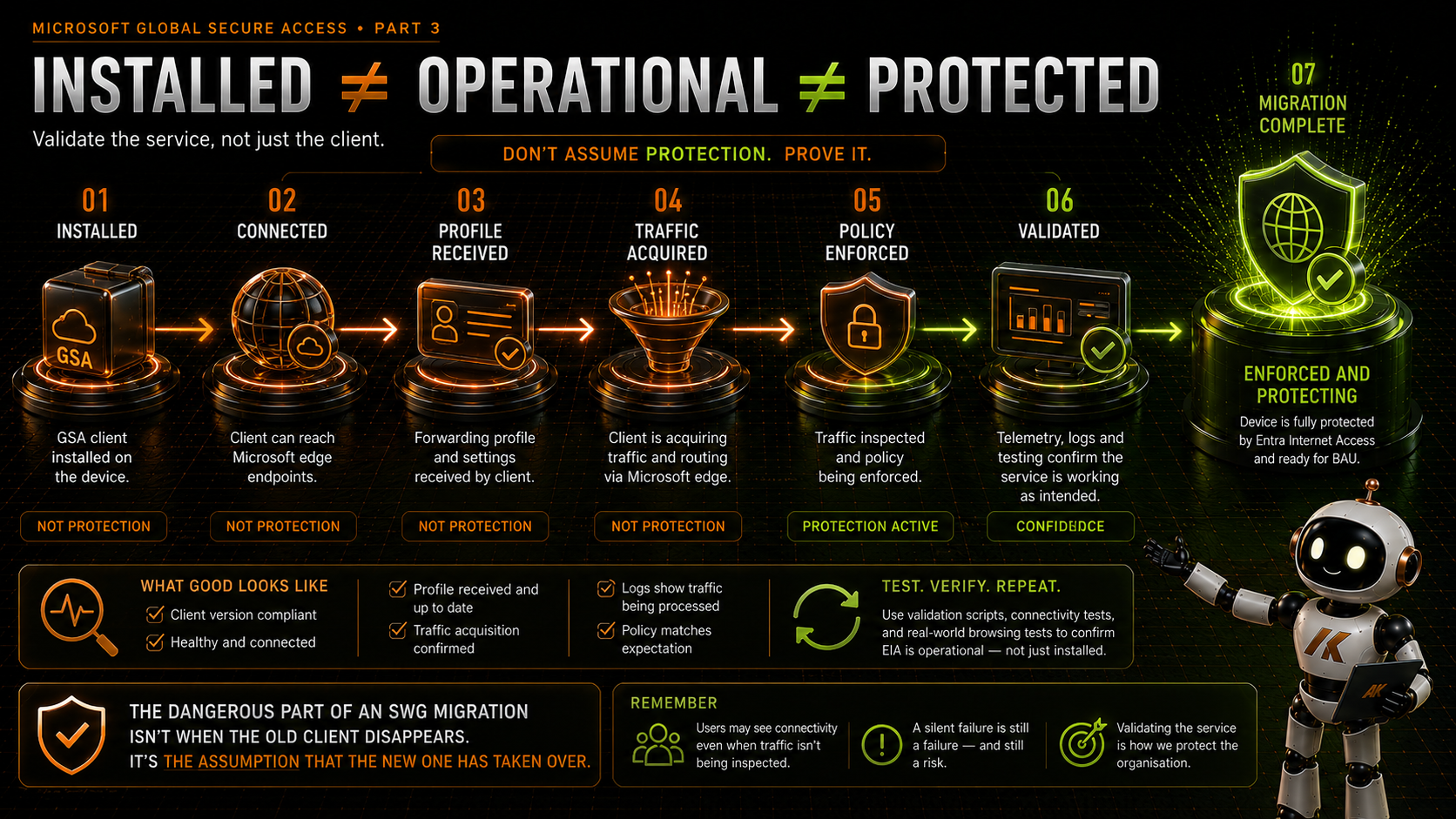
Installed does not mean operational.
State 6 --- GSA Validated
Now verify the client.
Microsoft exposes Advanced Diagnostics in the GSA client, including forwarding profile information. Microsoft’s Internet Access validation guidance also explicitly verifies that expected rules are present and that acquired public traffic appears under the Internet channel.
That is exactly the distinction we need.
A successful installation should not automatically mean:
MigrationComplete = 1
The device needs to reach an agreed operational state first.
Installed ≠ Operational ≠ Protected
This might be the most important lesson in the whole endpoint migration.
Software deployment platforms are very good at telling us:
Application installed successfully.
Security architecture needs to ask another question:
Is the security control actually operating successfully?
Those are not the same thing.
For GSA, I would want the migration validation process to establish as much of the following as we can reliably automate and monitor:
- GSA client installed
- expected GSA services/components healthy
- user/device able to connect as expected
- correct forwarding profile received
- expected Internet Access rules present
- intended traffic being acquired
- policy being enforced
- agreed application validation completed
Only after the agreed validation criteria pass should the endpoint be considered migrated.
Should This Be One Script?
My first instinct when looking at this problem was to build a single migration script.
It could:
- Check the migration prerequisites.
- Confirm the device is ready.
- Remove Forcepoint.
- Write the migration state.
- Install GSA.
- Validate the installation.
There is some appeal to that.
But the reboot makes things more complicated, and I also prefer having clear separation between destructive actions and validation.
So I would probably separate the workflow.
Legacy SWG Removal Package
The removal process:
- checks the device is approved for migration
- confirms the Transitional Security Baseline
- checks whether removal has already happened
- removes the incumbent SWG
- verifies removal
- records
LegacySWGRemoved - handles the required reboot
GSA Migration Package
The GSA deployment then has a requirement check.
It does not run unless:
LegacySWGRemoved = 1
and the incumbent client is independently confirmed as absent.
It then installs the supported Microsoft GSA client.
The custom logic exists around when installation is allowed to occur, not around reinventing the Microsoft installer.
Validation / Remediation
This is where I think Intune Remediations can be particularly useful.
Rather than asking Remediations to orchestrate the entire migration, use them to identify devices that are not in the state we expect.
For example:
Legacy SWG Removed = True
GSA Installed = False
That device is stuck.
Or:
GSA Installed = True
GSA Validated = False
That needs investigation.
Or:
Migration Complete = True
Legacy SWG Detected = True
Something has drifted or been reintroduced.
The remediation becomes the safety net and operational visibility around the process rather than the thing blindly driving every stage.
Keep the Migration Package Temporary
Do not make your permanent GSA deployment carry the legacy migration forever.
The migration package exists because the legacy SWG exists.
Once that product is gone from the estate, the migration logic has served its purpose.
I would therefore have two concepts.
GSA Migration Package
Used for existing devices.
It understands the legacy SWG.
It checks migration state.
It participates in the transition workflow.
It may contain additional logging and validation.
GSA Production Package
Used for the future state.
Clean.
Simple.
Based on the Microsoft-provided installer.
Normal application detection.
No Forcepoint logic.
No legacy migration state.
No historical baggage.
That second package becomes the package we eventually use for new devices and Autopilot.
Do Not Change Autopilot at the Start
This is another area where it would be easy to move too quickly.
Imagine the current environment has Forcepoint assigned as a required application during the Autopilot build.
We begin migrating production endpoints to GSA.
The obvious temptation is:
Forcepoint = No Longer Required
GSA = Required
and change the Autopilot application assignments.
I would not do that at the beginning.
Changing the build standard while simultaneously migrating the existing estate introduces another variable into an already complex transition.
It can also have a much wider blast radius than intended if those application assignments are shared with existing devices.
Instead:
Migrate the estate first. Change the build standard second.
During the migration window, I would leave the existing Autopilot requirements alone.
New devices continue to build using the known production standard.
Existing devices move through controlled migration cohorts.
That means you have one major change happening at a time.
Give the Migration Time to Stabilise
There is no magic number here.
The right period depends on the size of the organisation, device population, working patterns, application estate and risk appetite.
But I would not migrate the final cohort on Friday and change Autopilot on Monday.
In a large production environment, I would be inclined to allow something like a six-week migration and stabilisation window.
That is not a Microsoft recommendation.
It is simply the sort of operational window I would want when planning a migration like this.
It gives you time to:
- migrate controlled cohorts
- find devices that are rarely online
- identify application compatibility issues
- understand bypass requirements
- monitor support tickets
- validate policy behaviour
- investigate failed or stuck migrations
- confirm the new platform is stable
- deal with genuine exceptions
Most importantly, it gives you evidence.
You are no longer changing the default build because you think GSA is ready.
You are changing it because you have several weeks of production experience showing that it is.
Then Change the Build Standard
Once the estate has been migrated and the stabilisation criteria have been met, the architecture changes.
The legacy SWG is no longer the production standard.
At that point:
Autopilot
    ↓
GSA Production Package
    ↓
Global Secure Access
    ↓
Entra Internet Access
The legacy SWG can be removed from the standard build.
The temporary migration package can be retired once remaining exceptions have been handled.
The Transitional Security Baseline can then be reviewed on its own merits.
And the clean GSA package becomes normal BAU.
Use Migration Cohorts
I would also avoid trying to migrate the whole estate simultaneously.
Internet Access traffic forwarding supports user and group assignment, which gives us another useful control when piloting and phasing the service.
I would combine that with endpoint deployment cohorts.
Something like:
Technical Validation
        ↓
IT / Security Pilot
        ↓
Early Adopters
        ↓
Business Cohort 1
        ↓
Business Cohort 2
        ↓
Wider Production
        ↓
Exceptions / Stragglers
The exact structure is organisation-specific.
What matters is having measurable gates between them.
If Cohort 1 exposes a problem, stop.
Fix it.
Do not allow deployment momentum to become more important than the security outcome.
Define the Exit Criteria Before You Start
Before the first production device migrates, agree what migration complete means.
Not:
GSA installed.
Something closer to:
The legacy SWG has been successfully removed, the Global Secure Access client is healthy, the expected traffic forwarding profile is present, required traffic is being acquired, the agreed Entra Internet Access policy is enforced, critical applications have passed validation and no unresolved security-impacting issue remains.
Then define what allows the project to move from migration into BAU.
For example:
- agreed percentage of active estate successfully migrated
- agreed stabilisation period completed
- critical application testing complete
- unresolved failures below agreed threshold
- security monitoring operational
- service desk support process established
- exception process established
- rollback process tested
- Autopilot change approved
The percentages and thresholds are business decisions.
The important part is defining them before everybody is under pressure to declare the migration finished.
Design for Failure
A production migration should assume that some endpoints will fail.
Not because the design is poor.
Because endpoints are endpoints.
Machines go offline.
Users close laptops.
Installers fail.
Security software leaves components behind.
Reboots are postponed.
Devices have strange histories.
So ask:
What happens if the endpoint gets stuck at every stage?
If legacy SWG removal fails, the endpoint remains under the legacy SWG.
Good.
If the legacy SWG is removed but GSA does not install, the Transitional Security Baseline remains.
Good.
If GSA installs but does not receive its forwarding profile, the device should not be marked complete.
Good.
If validation fails, the migration state should tell support exactly where the device stopped.
That is why I like explicit state.
Instead of:
“GSA doesn’t seem to work on Sarah’s laptop.”
you can get closer to:
Migration State: GSA Installed
Legacy SWG: Absent
GSA Client: Present
Forwarding Profile: Not Validated
Migration Complete: False
That is far easier to support at scale.
Do Not Hide the Risk
Sometimes there may be a short period where the endpoint does not have exactly the same internet security capability it had before.
We should not pretend otherwise.
If MDE Web Content Filtering is providing the transitional control, and EIA will ultimately provide a richer identity-aware control model, then during the migration the endpoint may temporarily operate with reduced granularity.
That is a risk.
Document it.
Understand it.
Agree it.
Mitigate it.
But do not bury it inside an application deployment change.
Good security architecture is not about pretending risk does not exist.
It is about understanding where it exists, how long it exists, what reduces it and who accepts what remains.
A Controlled SWG Migration
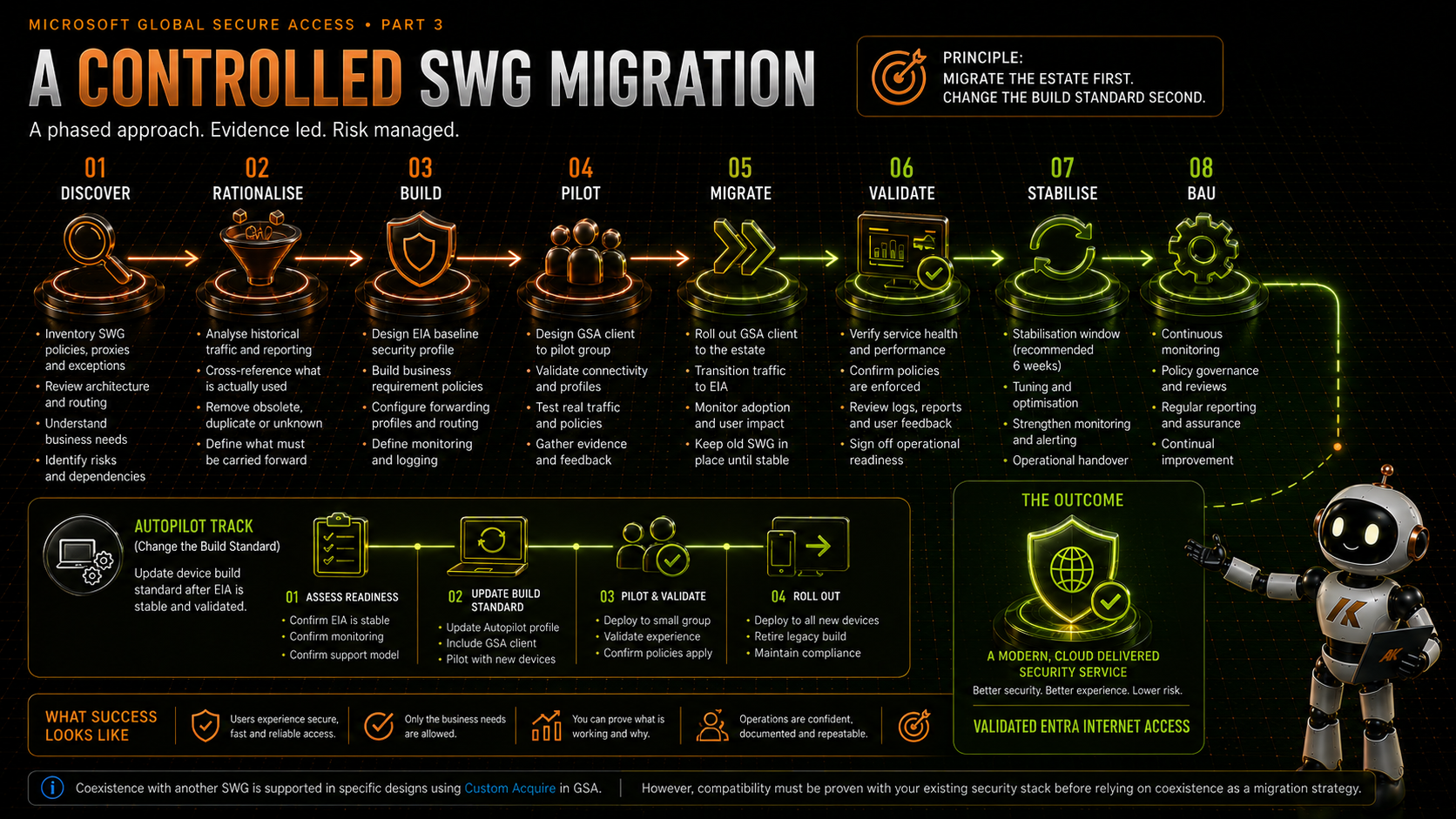
Put all of this together and my preferred high-level migration looks something like this:
DISCOVER
Legacy policy, traffic, applications, bypasses, dependencies
        ↓
RATIONALISE
What is genuinely still required?
        ↓
BUILD
New EIA baseline, business requirements, proven exceptions
        ↓
PROTECT THE TRANSITION
MDE / Network Protection / WCF / SmartScreen
        ↓
PILOT
Prove policy, client behaviour and coexistence assumptions
        ↓
MIGRATE
Legacy SWG removal → reboot → GSA installation
        ↓
VALIDATE
Client → profile → traffic → policy → applications
        ↓
STABILISE
Cohorts, monitoring, exceptions, support
        ↓
CHANGE AUTOPILOT
GSA becomes the standard build
        ↓
BAU
Retire migration logic and legacy SWG
This Is a Security Migration, Not an Application Deployment
That is probably the main thing I have taken away from working through this problem.
At first glance, replacing one endpoint SWG client with another looks like an endpoint management task.
Package the application.
Create the assignment.
Set the detection rule.
Deploy.
But the moment those applications are enforcing your internet security policy, the problem changes.
You are migrating a security control.
And you are deciding which parts of the old security policy deserve to exist in the new architecture.
That means we need to think about:
- policy rationalisation
- protection during transition
- control ownership
- migration state
- validation
- rollback
- risk acceptance
- monitoring
- operational readiness
- the future build standard
The application packaging is just one part of that.
Installed Is the Beginning, Not the End
Global Secure Access gives us an increasingly interesting platform for bringing Microsoft traffic, internet access and private application access into the same Security Service Edge architecture.
But getting there from an established Secure Web Gateway is not something I would rush.
Understand the existing policy, but do not worship it.
Use historical reporting where the value justifies the effort.
Build a clean baseline where you can.
Take forward only the requirements you can justify.
Test whether the clients coexist.
If they do, use that capability intelligently.
If they do not, build a controlled transition.
Establish an independent minimum security baseline.
Know what state each endpoint is in.
Expect reboots.
Expect failures.
Validate GSA rather than merely detecting it.
Migrate in cohorts.
Allow the new platform to stabilise.
And only then change the standard build.
Because there are two dangerous assumptions in an SWG migration.
The first is that every old policy still needs to exist.
The second is that installing the new client means it has successfully taken over.
Neither should be assumed.
Migrate the requirement, not the legacy configuration.
Installed does not mean operational.
Operational does not automatically mean protected.
Validate the security outcome.
What’s Next?
Once GSA is established, the next question is how it fits alongside the rest of the security stack.
Microsoft Defender for Endpoint.
SmartScreen.
Network Protection.
Conditional Access.
TLS inspection.
Endpoint security controls.
Existing network controls.
So in the next article in this series, I will look at:
Running Global Secure Access Alongside Your Existing Security Stack
and where the boundaries between those controls should actually sit.
References
-
Microsoft Learn --- Manage the Internet Access traffic forwarding profile
https://learn.microsoft.com/en-us/entra/global-secure-access/how-to-manage-internet-access-profile -
Microsoft Learn --- Configure Global Secure Access web content filtering
https://learn.microsoft.com/en-us/entra/global-secure-access/how-to-configure-web-content-filtering -
Microsoft Learn --- Web filtering in Global Secure Access (V2)
https://learn.microsoft.com/en-us/entra/global-secure-access/concept-web-filtering -
Microsoft Learn --- Configure Web Content Filtering with the Baseline Profile
https://learn.microsoft.com/en-us/entra/global-secure-access/tutorial-internet-access-web-content-filtering -
Microsoft Learn --- Microsoft Defender for Endpoint Web Content Filtering
https://learn.microsoft.com/en-us/defender-endpoint/web-content-filtering -
Microsoft Learn --- Microsoft Defender for Endpoint Network Protection
https://learn.microsoft.com/en-us/defender-endpoint/network-protection
Comments
No comments yet — be the first to leave one below.