
Entra Internet Access: Moving Web Security to the Identity Layer
For a long time, enterprise web security has been built around the network.
Traffic leaves the device.
It passes through a proxy, Secure Web Gateway or cloud security service.
Policy decides whether the destination is allowed.
The traffic continues to the internet.
That model works.
But it was designed for a world where the network was one of the primary security boundaries.
Today, users work from everywhere.
Devices move between corporate networks, home broadband, hotels, airports and mobile networks.
Applications have moved from datacentres to SaaS.
And identity has become one of the most important control planes in modern security.
So perhaps the interesting question isn’t:
How do we replace our existing web proxy?
Maybe it’s:
What should internet security look like when identity becomes part of the policy decision?
That’s where Microsoft Entra Internet Access starts to become interesting.
The Traditional Secure Web Gateway Model
Most organisations already have some form of internet security platform.
It might be an on-premises proxy.
It might be a cloud Secure Web Gateway.
It might be something that’s evolved through several generations of products.
But the basic objective is normally similar:
Get internet traffic through a security control before allowing it onto the internet.
That control might provide:
- web category filtering;
- malicious-site protection;
- URL filtering;
- application controls;
- TLS inspection;
- file inspection;
- logging;
- reporting; and
- policy exceptions.
There is nothing inherently wrong with that model.
The problem is what often happens to the policy over time.
A simple baseline gradually becomes:
Baseline policy
plus
department policy
plus
application bypass
plus
developer exception
plus
temporary workaround
plus
that rule nobody wants to remove because nobody remembers why it exists.
After enough years, the policy becomes an archaeological record of every access problem the organisation has ever encountered.
I’ve seen this plenty of times.
And if we’re moving to a new platform, simply recreating all of that configuration might be the worst possible starting point.
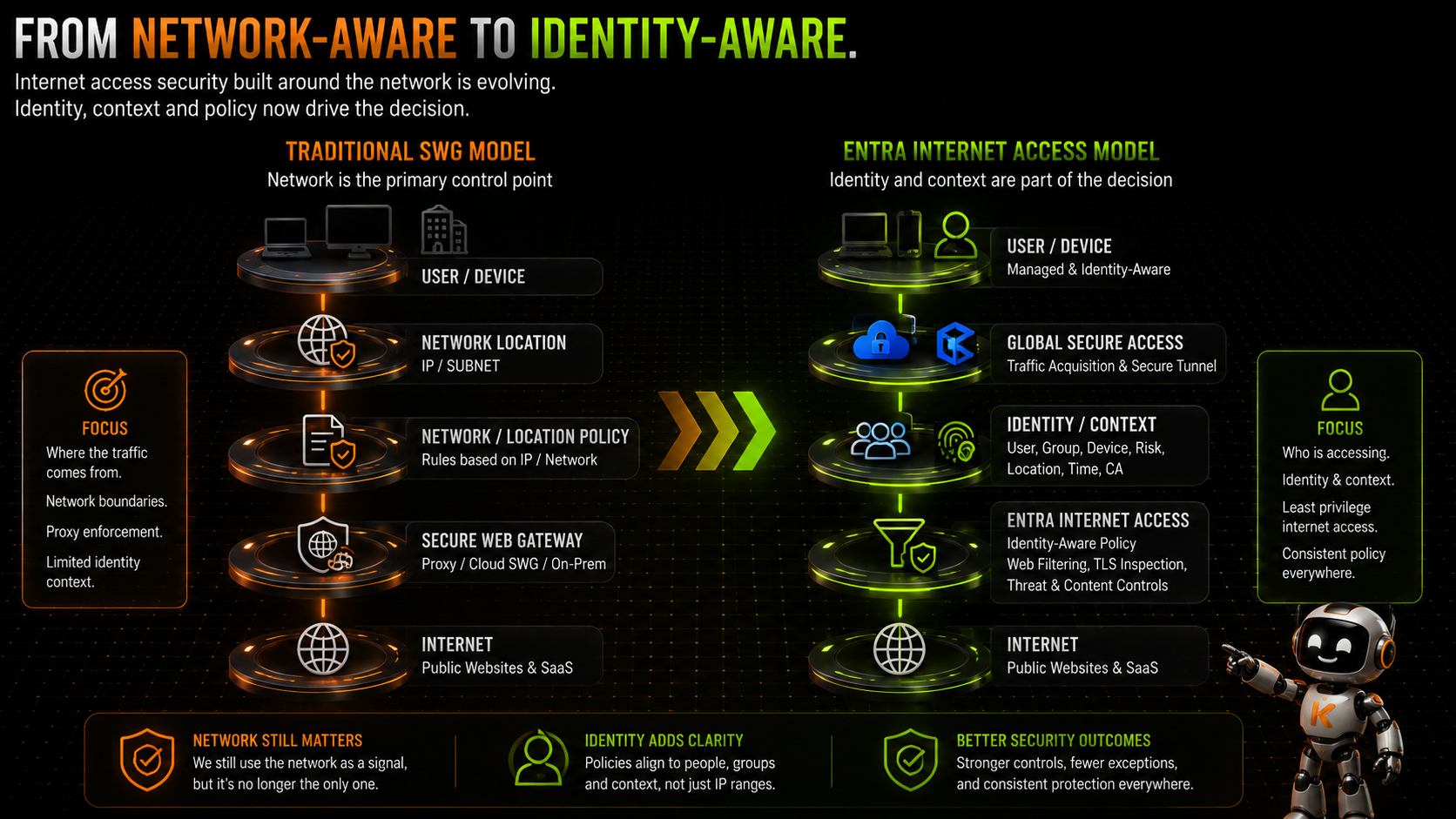
Entra Internet Access Changes the Control Point
Microsoft Entra Internet Access is part of Microsoft Global Secure Access, Microsoft’s Security Service Edge architecture.
At a high level, the traffic path is straightforward:
Managed Endpoint → Global Secure Access → Entra Internet Access → Internet
The Global Secure Access client acquires the relevant traffic from the endpoint and forwards it to Microsoft’s Security Service Edge.
Internet Access policies can then be applied before the traffic continues to its destination.
But the interesting part isn’t simply that Microsoft now has a cloud web security service.
It’s how that service fits into the wider Microsoft Entra architecture.
The same identity platform that already understands:
- users;
- groups;
- authentication;
- devices;
- Conditional Access; and
- risk
can now become part of the network security architecture.
That starts to change the policy model.
Identity Becomes Part of Internet Policy
This is the bit I think is particularly important.
Traditional internet policy has often been closely associated with the network or endpoint.
Where did the connection come from?
Which proxy is being used?
Which subnet is the device on?
Which endpoint configuration applies?
Those things can still matter.
But Global Secure Access gives us another powerful dimension:
Who is the user?
Internet Access traffic forwarding can be assigned to users and groups.
Security profiles can also be linked with Conditional Access to apply controls to specific users and groups.
That means policy can start to reflect the organisation rather than simply the network topology.
For example:
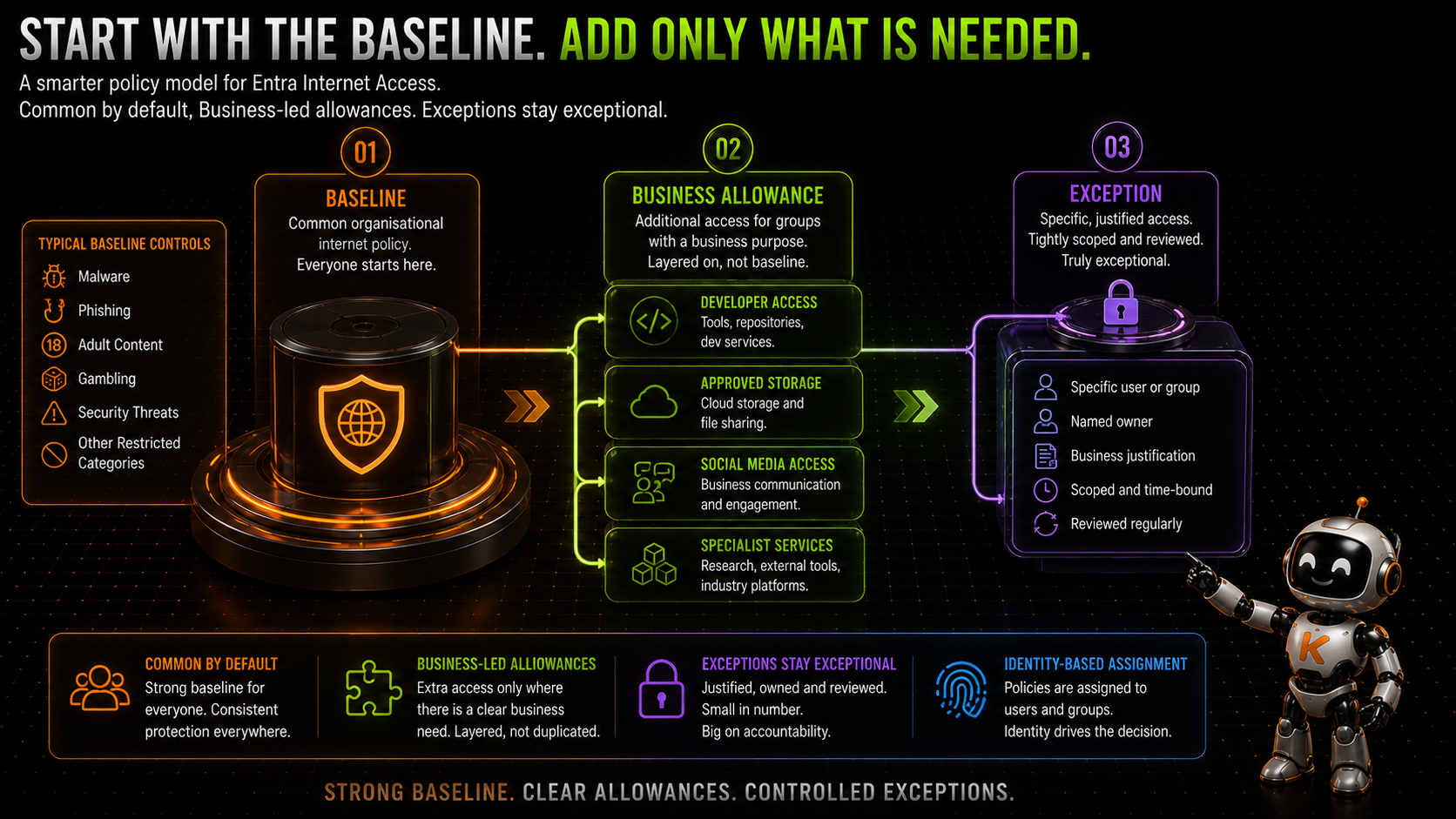
Everyone
gets the organisational baseline.
Developers
might additionally require access to development tools and services.
Communications teams
might require social media platforms.
A specific business team
might require access to a cloud storage service that isn’t appropriate for the rest of the organisation.
The policy begins with identity.
That doesn’t eliminate the network.
It makes the network one part of a broader access decision.
Start With the Baseline
If I were designing an Entra Internet Access deployment, I wouldn’t start by importing every existing rule from the incumbent Secure Web Gateway.
I’d start with a much simpler question:
What should the normal internet experience look like for the majority of users?
That becomes the baseline.
The baseline should contain controls that genuinely apply across the organisation.
For example, an organisation might decide to restrict categories associated with:
- malware;
- phishing;
- adult content;
- gambling;
- known security threats; or
- other categories that don’t meet organisational policy.
The exact baseline will obviously vary.
The important point is that it should represent the common security position.
Not every exception the organisation has ever created.
Then Add Business-Purpose Allowances
A baseline doesn’t mean everyone has identical business requirements.
Developers are an obvious example.
They might legitimately require access to sites and services that aren’t required by most users.
Other teams might need:
- personal storage platforms;
- social media;
- developer services;
- external collaboration tools;
- specialist research resources; or
- other categories that aren’t part of the normal organisational baseline.
My preference is to handle these through business-purpose allowance groups.
Conceptually:
Baseline Policy
+ Developer Allowance
+ Approved Storage Allowance
+ Social Media Allowance
rather than creating:
Developer Baseline
Marketing Baseline
Finance Baseline
Engineering Baseline
Partner Baseline
Special Baseline
and then trying to keep them all synchronised forever.
The baseline remains the baseline.
Additional access is layered on because there is a business reason for it.
Exceptions Should Actually Be Exceptions
Then we have genuine exceptions.
There will always be some.
A particular user may need access to something unusual.
A legacy application might depend on a destination that doesn’t fit neatly into the policy.
A supplier might introduce an unusual requirement.
That’s fine.
But an exception should be:
Specific.
Justified.
Owned.
Scoped.
Reviewed.
And ideally:
Temporary where possible.
This is where identity-based assignment becomes extremely useful.
Instead of weakening the baseline for everybody, we can scope the additional policy to the people who actually require it.
That is both easier to understand and easier to govern.
Web Content Filtering
At the centre of the Entra Internet Access policy model is web filtering.
Global Secure Access can control internet access based on things such as:
- web categories;
- fully qualified domain names;
- URLs; and
- other supported filtering conditions.
Policies are associated with security profiles, which determine how those controls are applied.
This gives us the familiar Secure Web Gateway capability of deciding which internet destinations should be accessible.
But there is an important distinction between FQDN filtering and URL filtering.
An FQDN might tell us:
www.example.com
A full URL might tell us:
www.example.com/specific/path
That additional visibility requires the service to see further into encrypted traffic.
Which brings us to TLS inspection.
TLS Inspection Changes What You Can See
Most internet traffic is encrypted.
That’s obviously a good thing.
But it also creates a challenge for web security platforms.
Without inspecting the TLS session, the security service can see less about what the user is actually requesting.
Global Secure Access supports TLS inspection for scenarios where that additional visibility is required.
That enables more granular capabilities such as URL-level filtering.
But TLS inspection isn’t something I would enable casually.
It introduces architectural and operational considerations around:
- certificate trust;
- application compatibility;
- certificate pinning;
- privacy;
- exclusions;
- troubleshooting; and
- regulatory requirements.
So I’d treat TLS inspection as a deliberate security capability rather than:
There’s a switch. Let’s turn it on.
Start with the requirement.
Understand what additional control you need.
Then decide whether TLS inspection is justified.
Internet Access Is Becoming More Than URL Filtering
This is also where the direction of Global Secure Access becomes interesting.
Internet Access isn’t stopping at traditional website categories.
Microsoft is expanding the platform with additional network security capabilities.
For example, content policies can control the movement of specific file types through internet applications.
Microsoft is also integrating Global Secure Access with Microsoft Purview for network-level data protection scenarios.
That potentially allows decisions to consider the content leaving the endpoint, not just the website receiving it.
Imagine the distinction between:
Can this user access this generative AI service?
and:
Can this user upload this sensitive document to this generative AI service?
Those are very different security questions.
Some of these capabilities are still evolving, and some Purview-backed functionality remains in preview at the time of writing.
So I wouldn’t build an entire production architecture around every emerging feature yet.
But the direction is important.
The Secure Web Gateway is becoming part of a broader identity and data-aware security platform.
What About Microsoft Defender?
This is another area where I think it’s important not to make the architecture unnecessarily binary.
If an organisation already uses Microsoft Defender for Endpoint, it may already be using capabilities such as:
- Network Protection;
- SmartScreen; and
- Web Content Filtering.
Introducing Entra Internet Access doesn’t mean endpoint security suddenly stops mattering.
These controls operate at different layers and can serve different purposes.
Endpoint controls can provide protection directly on the device.
Global Secure Access provides a cloud-delivered network security control plane.
During a migration, that distinction can actually be useful.
For example, an organisation transitioning away from an incumbent Secure Web Gateway may choose to maintain endpoint-level protection while the Global Secure Access client and Internet Access policies are progressively deployed and validated.
The objective isn’t:
Pick one Microsoft security product.
It’s:
Build the appropriate layers of control for the risk.
Don’t Lift-and-Shift the Old Secure Web Gateway
This is probably the biggest piece of advice I’d give anyone planning a migration.
Don’t assume every existing rule deserves to survive.
A legacy Secure Web Gateway configuration may contain years of:
- temporary bypasses;
- obsolete applications;
- users who have left;
- groups that no longer exist;
- old troubleshooting changes;
- duplicated rules;
- overly broad allowances; and
- policies nobody can explain.
Migrating that configuration exactly as it stands gives you a beautifully modern platform carrying a decade of technical debt.
Instead, use the migration as an opportunity to ask:
What is the baseline?
Which allowances have a genuine business purpose?
Which exceptions are still required?
Who owns them?
Can we prove they’re still being used?
Can we remove them?
That’s not just a product migration.
It’s policy rationalisation.
And that’s potentially one of the biggest benefits of doing the migration at all.
User Assignment Makes Pilot Deployment Easier
There is another practical advantage to the identity model.
The Internet Access traffic forwarding profile can be assigned to specific users and groups.
That means we don’t have to start with:
All Users.
In fact, I generally wouldn’t.
Start with a pilot group.
Validate traffic acquisition.
Validate the baseline.
Validate the applications people actually use.
Validate allowances.
Validate exceptions.
Validate user experience.
Then expand.
That gives us a controlled progression:
Technical Pilot → Business Pilot → Wider Cohorts → Production
rather than:
Enable → Hope
The same principle applies to security policy.
Build it.
Assign it to a controlled population.
Observe what happens.
Then expand.
Remote Networks Change the Picture Again
Global Secure Access isn’t limited to individual endpoint clients.
Microsoft and Internet Access traffic profiles can also be applied to remote networks.
That means a branch office can connect to Global Secure Access and have appropriate traffic processed through Microsoft’s Security Service Edge without requiring the Global Secure Access client to provide the traffic path for every individual endpoint.
That creates an interesting architecture.
We can potentially have:
Managed endpoint
Device → GSA Client → Global Secure Access
and:
Branch network
Branch → Remote Network Connectivity → Global Secure Access
feeding into the same broader security platform.
There are differences in what context and controls are available between client-based and remote-network traffic, so they aren’t identical models.
But architecturally, this starts to bring endpoint and branch internet security together.
Where Does Private Access Fit?
Internet Access isn’t the answer to every destination.
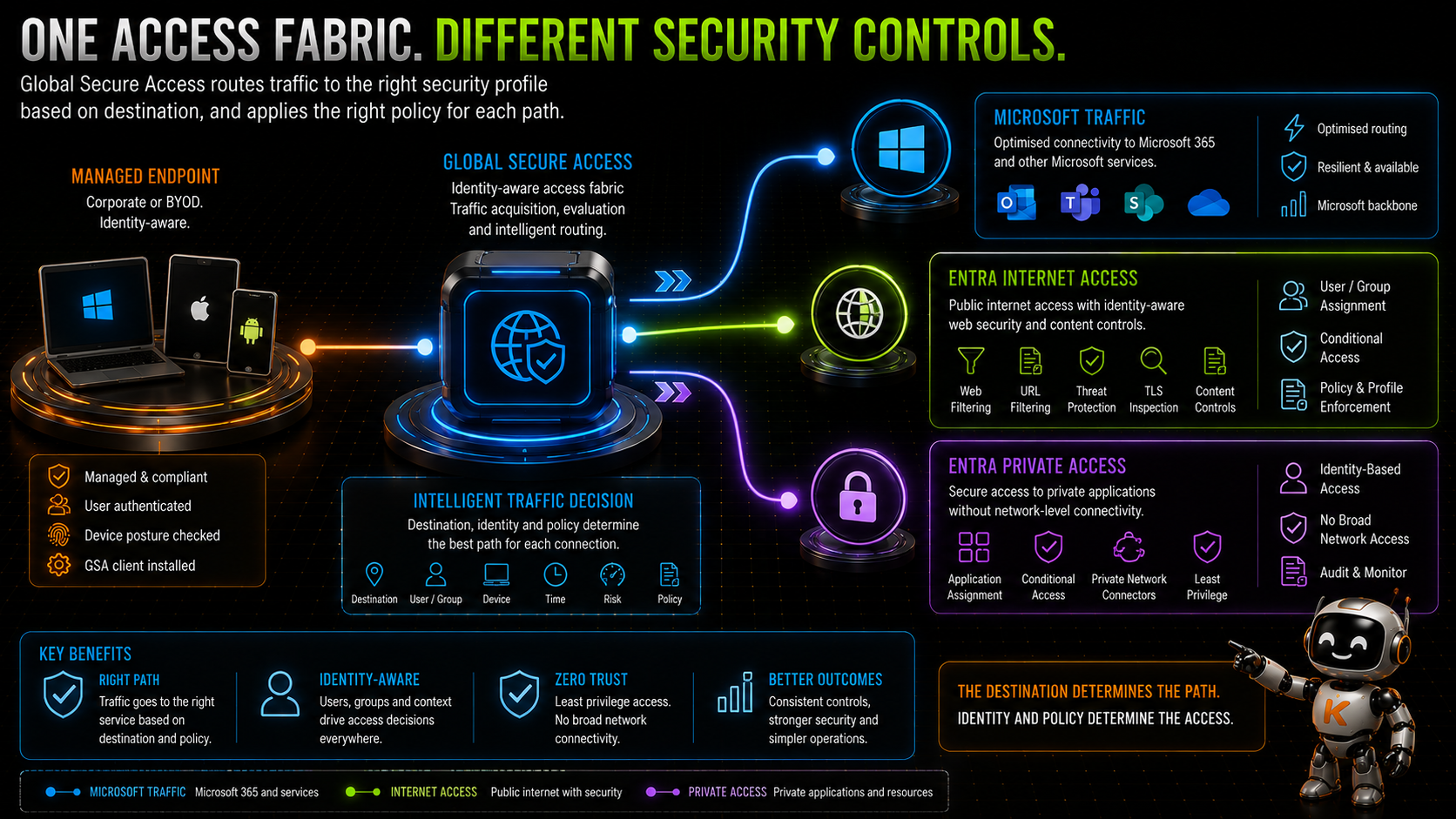
That’s why Global Secure Access has multiple traffic profiles.
At a simplified level:
Microsoft traffic
goes through the Microsoft traffic profile.
Private resources
go through Entra Private Access.
General internet traffic
goes through Entra Internet Access.
The Global Secure Access service evaluates traffic against the appropriate forwarding profiles and applies the relevant path.
This matters because we shouldn’t try to force every requirement through Internet Access.
An internal application isn’t an internet filtering problem.
It’s a Private Access problem.
And sometimes there are more unusual requirements.
For example, I’ve previously written about SaaS applications that require connections to originate from a known public IP address.
In those scenarios, Entra Private Access can provide an alternative architecture where traffic is routed through Private Network Connectors and a controlled Azure egress path.
The destination might technically be on the internet.
But the access requirement makes it a different architectural problem.
One Access Fabric
This is where the broader Global Secure Access architecture starts to make sense.
Historically we might have had:
VPN platform
for internal applications.
Secure Web Gateway
for internet access.
Different network controls
for branch offices.
Separate controls
for Microsoft 365.
Each evolved independently.
Global Secure Access starts bringing those traffic paths into a common architecture.
Not necessarily one identical policy.
Not one giant tunnel.
But a common access fabric.
The destination determines the path.
Identity and policy help determine the access.
That’s a much more interesting proposition than simply:
Microsoft has built another web proxy.
What I’d Do in a Real Deployment
If I were approaching an Entra Internet Access deployment today, I’d break it into a few deliberate stages.
Discover
Understand the existing Secure Web Gateway.
Export the policies.
Identify the categories being controlled.
Find the bypasses.
Find the exceptions.
Find the applications with unusual dependencies.
And, importantly, find out who owns them.
Rationalise
Don’t migrate everything.
Separate:
Baseline
from:
Business Allowance
from:
Genuine Exception
Remove what no longer has a reason to exist.
Build
Create the Internet Access traffic profile.
Build the baseline policy.
Create the required security profiles.
Define the assignment groups.
Configure the endpoint deployment.
Pilot
Start small.
Validate traffic forwarding.
Validate policy.
Validate business applications.
Validate user experience.
Look at the logs.
Then widen the pilot.
Migrate
Move users in controlled cohorts.
Keep the old platform available until the new path has been validated.
Don’t remove the incumbent security control simply because the new client installed successfully.
Installed does not mean operational.
Operate
Once the migration is complete, don’t let the new policy become the next archaeological dig.
Review allowances.
Review exceptions.
Remove obsolete configuration.
Keep ownership current.
And treat internet policy as something that has a lifecycle.
This Is Still a Security Architecture
There is a temptation with cloud services to think the product does the architecture for us.
It doesn’t.
Entra Internet Access gives us capabilities.
We still have to decide:
- what the baseline should be;
- who gets additional access;
- how exceptions are approved;
- how TLS inspection is introduced;
- which traffic should bypass;
- how endpoint deployment works;
- how branches are handled;
- how policy changes are governed;
- how incidents are investigated; and
- when legacy controls can safely be removed.
Those are design decisions.
The technology just gives us a different set of tools with which to make them.
Moving Web Security Towards Identity
I don’t think Entra Internet Access makes the network irrelevant.
Nor do I think identity suddenly replaces every other security signal.
That’s not really what Zero Trust means.
What it does is allow internet security to become part of the same identity-aware architecture we’re already building around Microsoft Entra.
Instead of thinking only about:
Device → Network → Proxy → Internet
we can start thinking about:
User + Device + Context → Policy → Resource
That’s a subtle change.
But architecturally, it’s a significant one.
And if you’re already using Microsoft Entra for identity, Conditional Access and Private Access, bringing internet security into that same control plane starts to become very compelling.
What’s Next?
There’s one question I’ve deliberately avoided going too deeply into here.
How do you actually move from an existing Secure Web Gateway to Entra Internet Access without leaving users unprotected or breaking everything?
Because installing the Global Secure Access client is the easy bit.
Migrating years of policy, dealing with endpoint coexistence, validating the new security path and deciding when the old platform can safely be removed is where things become more interesting.
In the next part of this series, I’ll look at:
Migrating from a Traditional Secure Web Gateway to Global Secure Access.
And why the safest migration might not involve running both platforms together at all.
References
- Microsoft Learn – Global Secure Access documentation
- Microsoft Learn – Global Secure Access traffic forwarding profiles
- Microsoft Learn – Manage the Internet Access traffic forwarding profile
- Microsoft Learn – Configure Global Secure Access web content filtering
- Microsoft Learn – Configure web content filtering with the baseline profile
- Microsoft Learn – Configure URL filtering and custom block pages
- Microsoft Learn – Configure content policies
- Microsoft Learn – Create content policies for network content filtering
- Microsoft Learn – Global Secure Access remote network connectivity
Comments
No comments yet — be the first to leave one below.