
Passkeys: The Hardest Part Nobody Talks About
Passkeys are not the problem. Getting users to their first passkey is where the real work begins.
Introduction
Everyone is talking about passkeys.
MSPs, consultants, vendors and security teams are all asking the same questions:
- Are you ready for passkeys?
- Have you enabled passkeys yet?
- Are passwords finally dead?
And to be clear, I am a huge fan of passkeys.
They are phishing-resistant, user-friendly and a significant improvement over traditional passwords and legacy MFA methods.
The good news is that the technology works. In many cases, it works incredibly well.
But after spending the last few months testing Microsoft Authenticator passkeys, synced passkeys, FIDO2 security keys and Windows Hello for Business, I have come to an interesting conclusion:
The challenge isn’t passkeys.
The challenge is getting users to their first passkey.
Most discussions focus on the destination.
A passwordless future.
Phishing-resistant authentication.
A world without passwords.
What very few people discuss is how users actually get there.
Because this is where onboarding, Conditional Access, device compliance, recovery processes and user experience all collide.
A passkey project doesn’t succeed because you enabled passkeys in Microsoft Entra ID.
A passkey project succeeds when users can securely register their first passkey and confidently use it every day.
And from my experience so far, not all passkey journeys are created equal.
Passkeys Are Brilliant
Let’s get one thing out of the way.
Passkeys are one of the most important improvements we have seen in enterprise authentication for years.
They provide:
- Phishing-resistant authentication
- A significantly better user experience
- Reduced dependence on passwords
- Better alignment with Zero Trust principles
- Stronger protection against credential theft
For users, the experience can be refreshingly simple.
No password to remember.
No SMS code to type.
No approval fatigue from endless MFA prompts.
Just a biometric, PIN or security key.
From both a security and usability perspective, passkeys are a huge step forward.
So if you’re expecting an article arguing against passkeys, this is not it.
I firmly believe passkeys are the future.
The conversation is not whether we should use passkeys. It is how users get their first one.
The Bit Nobody Talks About
Most passkey conversations focus on the end state.
The user signs in using:
- Face ID
- Fingerprint
- Windows Hello
- A FIDO2 security key
Job done.
But users don’t magically arrive at that destination.
Before they can use a passkey, they need to register one.
Before they can register one, they usually need to authenticate.
Before they authenticate, Conditional Access may already be asking questions such as:
- Is the device compliant?
- Is the device managed?
- Is MFA satisfied?
- Is the application approved?
- Is access to registration pages allowed?
This is where many passwordless projects run into issues.
Not because passkeys don’t work.
Because onboarding hasn’t been fully thought through.
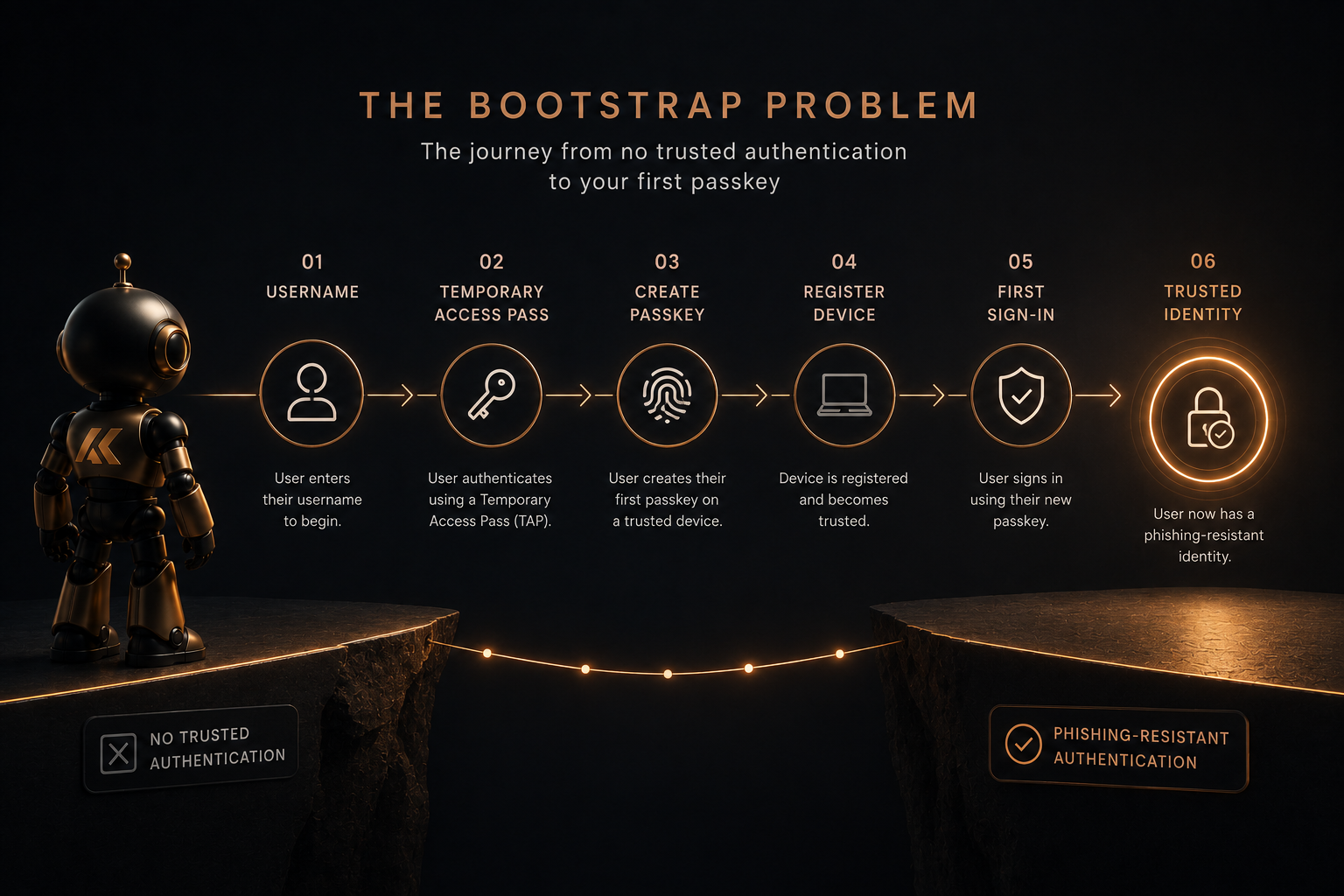
I guess we can call this the bootstrap problem.
How do you securely get a user from having no trusted authentication method to having their first passkey?
Microsoft Authenticator Passkeys: The Cleanest Bootstrap Experience?
Of all the registration journeys I have tested, Microsoft Authenticator currently feels like the cleanest onboarding experience for new users.
The journey is surprisingly straightforward:
- Install Microsoft Authenticator.
- Enter your username.
- Enter a Temporary Access Pass (TAP).
- Create a passkey.
- Register the device.
- Sign in.
That’s it, from a new starter perspective, this is incredibly powerful. Their phone becomes the first trusted device. This allows the user to set up their authentication method before their laptop has even been unpacked.
Once the passkey exists, that same passkey can then be used to support other onboarding experiences, including Microsoft 365 and Windows Autopilot scenarios. For me, this is one of the biggest strengths of the Microsoft Authenticator approach.
It solves the bootstrap challenge very effectively.
Synced Passkeys: Brilliant, But They Need Planning
In terms of long-term user experience, synced passkeys are fantastic. For many users, they may ultimately be the best option.
Solutions such as:
- Apple Passwords
- Google Password Manager
- Bitwarden
- 1Password
provide an excellent user experience, the passkeys can sync between devices which makes recovery simpler. Users can move to a new phone and continue working with minimal disruption.
From a usability perspective, that’s incredibly attractive, but there is an important question.
How does the user register that first synced passkey?
In many scenarios, the answer involves:
- Accessing My Security Info
- Registering a new sign-in method
- Selecting a passkey provider
- Completing a QR code registration flow
And this is where things become interesting.
What happens if Conditional Access prevents users from accessing registration pages from unmanaged or non-compliant devices?
What happens if users cannot get to Security Info in the first place?
This isn’t a reason to avoid synced passkeys, far from it, it’s a reason to properly design the onboarding journey.
FIDO2 Security Keys: Strong Security, Same Challenge
FIDO2 security keys remain one of the strongest authentication options available.
Particularly for:
- Administrators
- Privileged users
- High-security environments
They provide excellent phishing resistance and are often a key component of a mature authentication strategy.
But the same bootstrap questions still apply.
How does the user:
- Receive the key?
- Register the key?
- Register a backup key?
- Recover if the key is lost?
- Register if they only have access to unmanaged devices?
Again, the technology is not the challenge.
The onboarding process is.
Windows Hello for Business: Destination, Not Bootstrap
I also think Windows Hello for Business is frequently misunderstood in passwordless discussions.
Windows Hello for Business is fantastic.
I use it daily, most users love it.
But it is usually not the starting point, it’s the destination.
In a typical modern deployment, the device needs to:
- Be provisioned
- Complete Autopilot
- Enrol into Intune
- Become compliant
- Provision Windows Hello for Business
Only then does the user start benefiting from passwordless sign-in through Windows Hello.
That creates a chicken-and-egg scenario.
Ideally, the user already has a phishing-resistant authentication method before Autopilot begins.
Which brings us back to:
- Microsoft Authenticator passkeys
- Temporary Access Passes
- FIDO2 keys
- Other bootstrap mechanisms
The first credential is often harder than every credential that follows.
The TAP Question
The more I work with passkeys, the more I realise how important Temporary Access Passes are.
For Microsoft Authenticator onboarding, a single-use TAP works exceptionally well.
A typical journey looks like this:
- User receives TAP.
- User signs in.
- User registers a passkey.
- User becomes productive.
Simple.
But things become more complicated when users need to:
- Register synced passkeys
- Register FIDO2 keys
- Register Windows Hello for Business
- Add additional devices
- Recover from failed registrations
This is where longer validity periods or multi-use TAPs can become attractive.
However, organisations need to treat TAPs with care.
TAPs are powerful bootstrap credentials.
The convenience they provide must always be balanced against security and governance requirements.
Passkey Adoption: The Missing Operational Layer
Getting a user to their first passkey is one challenge.
Getting an entire organisation from traditional MFA to passkeys is another.
Most organisations already have users authenticating with:
- Microsoft Authenticator notifications
- Microsoft Authenticator TOTP codes
- SMS
- Phone calls
- Third-party MFA providers
The real question becomes:
How do we migrate users from traditional MFA to phishing-resistant authentication without causing disruption?
In my opinion, passkey adoption should be treated as a managed migration rather than a one-off technical project.
Step 1 - Identify Eligible Users
Start by identifying users who:
- Already have Microsoft Authenticator registered
- Are actively signing in
- Are not currently using passkeys
- Are part of a pilot or rollout phase
These users become your migration candidates.
Step 2 - Educate Users
Users need more than a technical change.
They need guidance.
A successful campaign should explain:
- What a passkey is
- Why the organisation is moving away from traditional MFA
- What the benefits are
- What action the user needs to take
- Where they can find support
This is exactly where a dedicated onboarding website can provide significant value.
Instead of pointing users at a generic Microsoft article, you guide them through a tailored registration journey for their device and authentication method.
Step 3 - Monitor Passkey Registration
This is where automation becomes extremely useful.
A scheduled Azure Function or automation process could query Microsoft Graph and determine whether users have successfully registered:
- Microsoft Authenticator Passkeys
- Synced Passkeys
- FIDO2 Security Keys
- Windows Hello for Business credentials
At this point, organisations move from assumptions to facts.
You can see exactly who has adopted phishing-resistant authentication and who has not.
Step 4 - Automatically Update Membership
Once a qualifying authentication method is detected, automation could place users into a dedicated Entra security group.
For example:
- GRP-Authentication-Passkey-Registered
- GRP-Authentication-PhishingResistant
Conditional Access policies could then target those groups.
This creates a phased and controlled migration approach.
Rather than forcing every user onto phishing-resistant MFA at once, users naturally move into enforcement as they complete onboarding.
Step 5 - Measure Adoption
One of the biggest challenges with authentication projects is visibility.
Security teams want answers to questions such as:
- How many users have registered a passkey?
- Which authentication methods are being adopted?
- Which departments are lagging behind?
- How many users still rely on traditional MFA?
- How many users have reached phishing-resistant authentication?
With the right reporting solution, this information could be surfaced through Power BI dashboards, operational reports and adoption metrics.
At that point, passkey adoption becomes measurable rather than anecdotal.
Why This Matters
Many discussions focus purely on enabling passkeys.
Very few focus on user adoption.
In reality, successful passkey projects require three things:
- A secure bootstrap process.
- A simple onboarding experience.
- A repeatable mechanism to track adoption and enforce standards.
Without all three, organisations often enable passkeys without achieving meaningful usage.
The challenge isn’t enabling the feature.
The challenge is helping users successfully adopt it.
The Real Question Organisations Should Ask
Most organisations are asking:
Are we ready for passkeys?
I think the better question is:
How will our users get to their first passkey?
That question forces organisations to think about:
- Device trust
- Conditional Access
- Temporary Access Passes
- User onboarding
- Recovery processes
- Helpdesk procedures
- End-user documentation
- Reporting and adoption metrics
- Testing and validation
Because successful authentication projects are not measured by configuration settings.
They are measured by user adoption.
Where My Thinking Has Landed
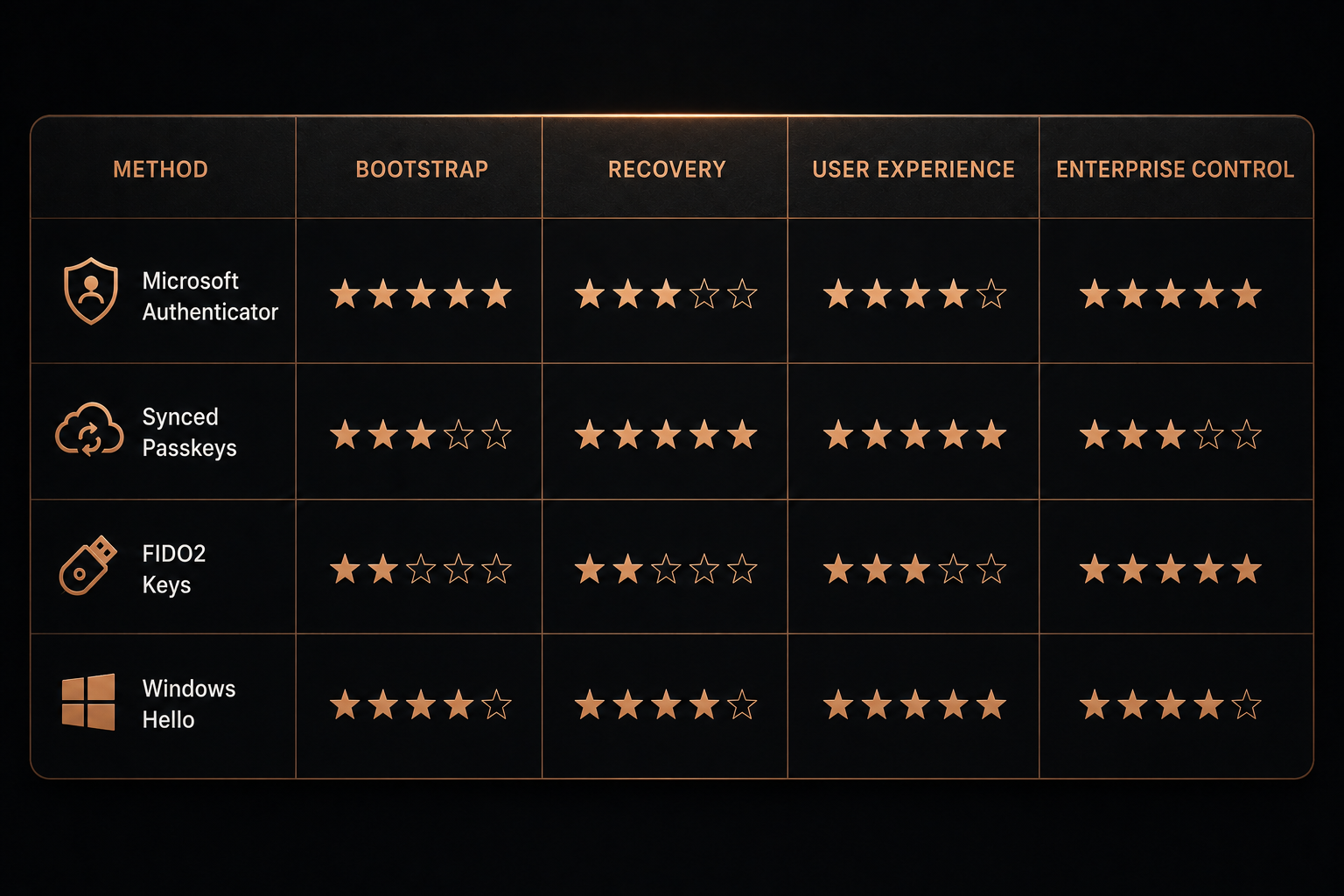
After testing Microsoft Authenticator passkeys, synced passkeys, FIDO2 security keys and Windows Hello for Business, I have reached a fairly simple conclusion.
Passkeys are absolutely the future.
But not all passkey journeys are equal.
Microsoft Authenticator currently provides one of the cleanest onboarding experiences for new users because it solves the bootstrap problem so effectively.
Synced passkeys are excellent and may well provide the best long-term experience for many users, but they require careful planning around onboarding, access, recovery and Conditional Access requirements.
FIDO2 security keys remain a strong option, particularly for privileged access scenarios, but registration and recovery should never be an afterthought.
Windows Hello for Business continues to be an outstanding passwordless experience, but it is usually the destination rather than the starting point.
I also firmly believe that organisations will increasingly need automation-led adoption strategies to move users from traditional MFA to phishing-resistant authentication at scale.
Simply enabling passkeys is not enough.
Successful organisations will educate users, monitor registration, automate enforcement and measure adoption.
Conclusion
Passkeys are not the challenge.
The challenge is getting users to their first passkey.
The organisations that succeed with passwordless authentication won’t necessarily be the ones that enable passkeys first.
They will be the organisations that make onboarding simple, secure and understandable.
Because at the end of the day, users don’t care about WebAuthn standards, authentication strengths or bootstrap credentials.
They care about one thing:
Can I securely sign in and get my job done?
If we can answer that question, passkey adoption becomes much easier.
And that is the hardest part nobody talks about.
Comments
No comments yet — be the first to leave one below.